Schedule text messages
Program terms · updated October 26, 2026
LodgeSight is the back-office software hotels use to build staff schedules. When your hotel uses LodgeSight, it can send you your work schedule by text message. This page explains what you will receive, how you say yes, and how you stop.
What you will receive
- A text when your hotel publishes a week's schedule that includes you: the hotel's name, the week, how many shifts you have, when the first one starts, and a link to see your week.
- A text when one of your own shifts is changed, added or removed after the week was published, saying what changed.
Message frequency varies with your schedule. Most people receive one message a week when the schedule is published, plus a message for each change to their own shifts. Message and data rates may apply.
How you opt in
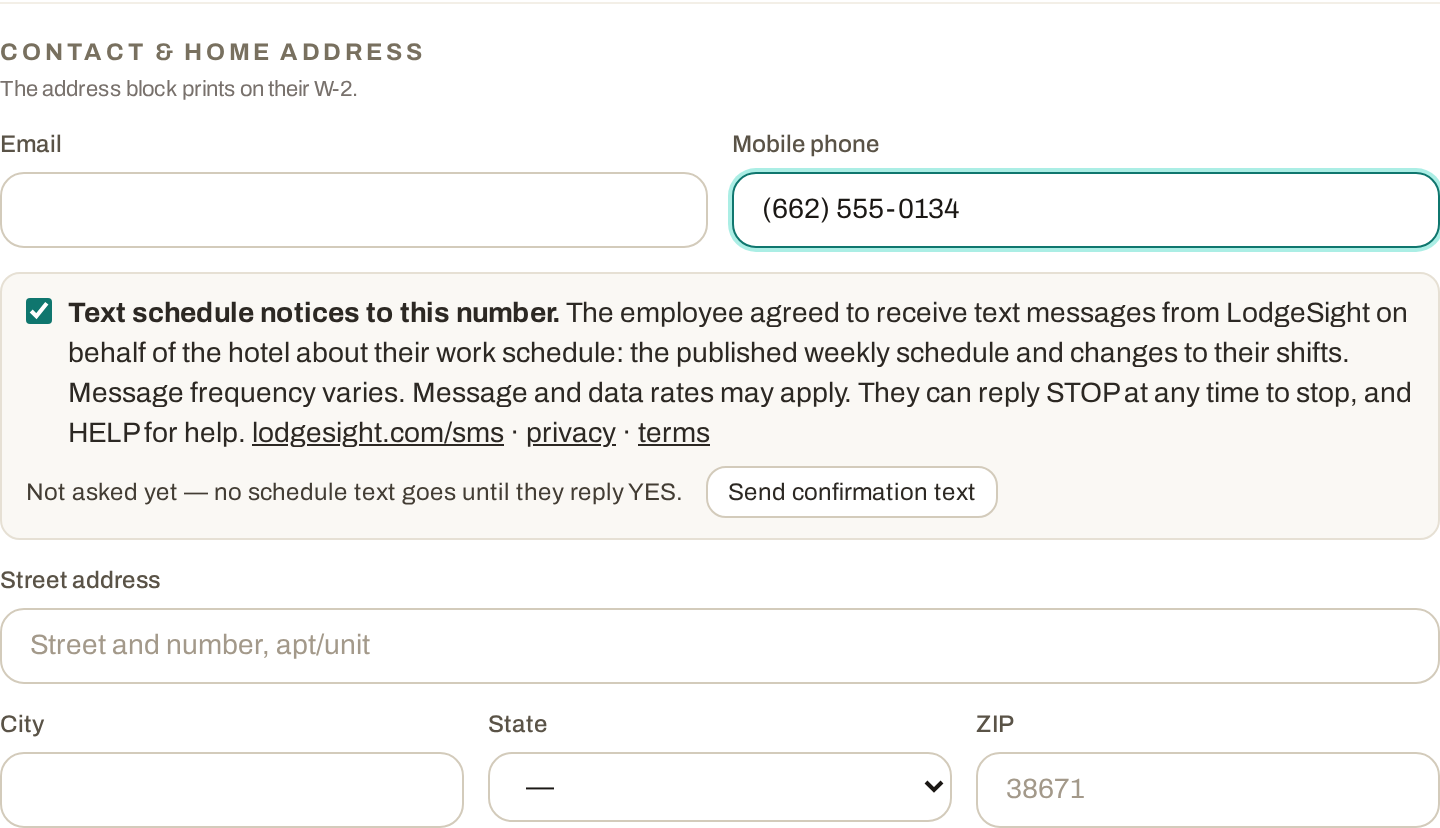
- You give your hotel your mobile number and agree to receive schedule texts. This happens on the employee intake form at hire, or when your manager updates your employee profile in LodgeSight with your permission. The form reads:
Text message consent. By providing my mobile number and checking this box, I agree to receive text messages from LodgeSight on behalf of my employer about my work schedule, including the published weekly schedule and changes to my shifts. Message frequency varies. Message and data rates may apply. I can reply STOP at any time to stop receiving texts, and HELP for help. See lodgesight.com/sms, the privacy policy and the terms.
- LodgeSight then sends one confirmation text to your number:
Confirmation textLodgeSight: Hampton Inn Southaven would like to text you your work schedule and changes to your shifts. Reply YES to receive them. Msg frequency varies. Msg & data rates may apply. Reply STOP to opt out, HELP for help. lodgesight.com/sms
- You reply YES. Nothing else is sent to your number until you do. If you do not reply, you receive no schedule texts; your hotel can still reach you by email and in the app.
Where the consent is collected in the app (a manager's screen, shown here with sample data):
How you stop
Reply STOP to any message. You will get one confirmation that you are unsubscribed and nothing further. Your hotel will see that you have opted out and will reach you another way. To start again, reply START, or ask your manager to send a new confirmation text.
Help
Reply HELP to any message, or email privacy@lodgesight.com. Your hotel's manager can also turn texts off for you in your employee profile at any time.
Your number is not shared
Your mobile number is used only to send the messages described on this page. No mobile information will be shared with third parties or affiliates for marketing or promotional purposes. See the privacy policy.
Carriers
Supported carriers include AT&T, T-Mobile, Verizon, US Cellular and most regional carriers in the United States. Carriers are not liable for delayed or undelivered messages.